Walkthrough
Example 01 — Continuous loop
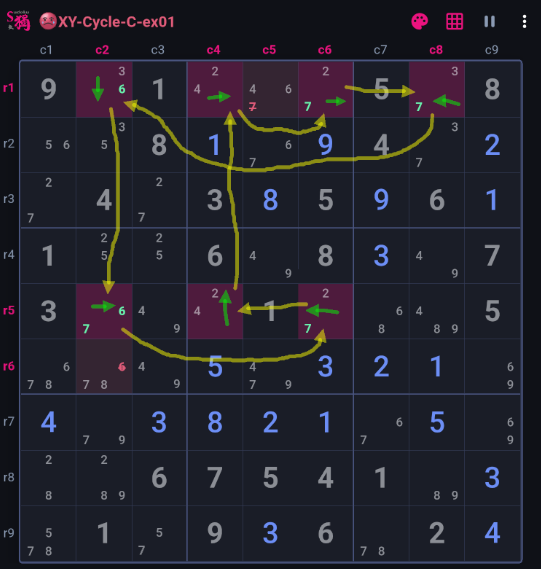
The loop on number 2, 3, 4, 6 and 7 is illustrated below with green strong links and yellow weak links. The loop starts from cell r1c2, if cell r1c2 were not number 3, then it must be number 6(strong link), then cell r5c2 could not be number 6(weak link), then cell r5c2 must be number 7(strong link), then cell r5c6 cannot be number 7(weak link), then cell r5c6 must number 2(strong link), then cell r5c4 could not be number 2(weak link), the cell r5c4 must be 4(strong link), then cell r1c4 could not be number 4(weak link), then cell r1c4 must be number 2(strong link), then cell r1c6 could not be number 2(weak link), then cell r1c6 must number 7(strong link), then cell r1c8 could not be number 7(weak link), then cell r1c8 must number 3(strong link), then back to the starting cell, r1c2 could not be number 3(weak link).
This is a perfect continuous loop that alternates cleanly all the way around, the loop can be flollowed in either direction (try it yourself).
Because the loop closes without a break, every weak-link end cells in the loop behave as a forced pair and one of them must contain linked number. Therefore, any cell that sees both ends of a weak link can have linked number eliminated. As it shows, number 6 can be removed from cell r6c2 because it sees two end cells r1c2 and r5c2 of a weak link on shared number 6; similarly, number 7 is removed from cell r1c5.
What to notice: A continuous loop move between bivalue cells with each cell sharing a number with its next cell. It is easier if you following the loop from the start to the end this way: 36->67->72->24->42->27->73->36.